Thursday, October 13, 2022

DynCont#7 Paper publication Ideas to follow up.

 Controls

  1. PD control steady stater error in servo control analysis and physical meaning
  2. PD / PID + Mapping of the initial trajectory required + Using preknown offset to modify the desired path beforehand from system identification +  Tune this controller using LQR using closed form algebraic solution of Ricatti equation 
  3. Weight the negative error more than the positive error to simulate the non allowable tool plunging while optimizing LQR (x^3-x^2-x)^2 rather than x'Qx. 
  4. Model reference adaptive controller . 
  5. Mode predictive controller for AMB 
  6. RAMB. Flexible mode control using RAMB. How to damp the flexible modes.
  7. Simulation model of shaft on AMB with Dynamic modal decomp, sparse SINDY, DMD with control , DMD without control!...
  8. Kalman filter post on linked in https://bitbucket.org/tremaineconsultinggroup/observer_luenberger/src/master/

 Gas turbines

  1. PID controller with gain scheduling for gas turbine
  2. LQR / LQG controller for gas turbine
  3. MPC controller for gas turbine
  4. Model reference adaptive controller for gas turbine

Foil bearings

  1.  Link model FEM from IISC course+ Psedospectral method
  2. Orbit simulation
  3. Stability analysis
  4. FDM  / FVM / Commercial solver comparison for Foil bearing
  5. Software for foil beairng load capacity estimation

Sunday, October 9, 2022

DynCont#6 Optimal control resources for preparation

  • Video lectures =  AA4CC lectures (Lecture 2 missing)
  • Video lectures = Neuro match academy, good explanation, https://www.youtube.com/playlist?list=PLkBQOLLbi18NSMbvuDS2WaXLWctg3QArY
  • Video lectures = Barjeev Tyagi, IIT Roorkee, https://nptel.ac.in/courses/108107098
  • Video lectures - Shyam Kamal, IIT BHU, EE564,  https://www.youtube.com/playlist?list=PLHEIL5MR2cEGqWdrFvzxDwR6Lw-D5ETWY
  • Video lectures = G D Ray, IIT KGDP, https://www.youtube.com/playlist?list=PLbMVogVj5nJQNzJT6sYZpB7H1G6WF0FZ4
  • Optimal control 2022 https://www.youtube.com/playlist?list=PLZnJoM76RM6Iaf59ICcU9-DzztGZvK_52
  • Kirk Introduction to optimal control book

Tuesday, September 27, 2022

Investing in India - Points from Nitin Kamat, Zerodha

Trade volume

  1.  90% of the trades made in Indian stock market is done by traders doing intraday. They are 3% of the DEMAT account holders
  2. 97% of people are doing investing and not intra day
  3. This 97% of people contribute insignificantly to the trade volume in India

Growth expectation by Venture capitalists

  1. VC investors want growth. Not profitabilityFor VC, it is ok to spend 400 Rs for customer acquisition who will give 200Rs profit at the max
  2. VC will have 7 year investment cycle
  3. VC 1 will have to exit after 7 years, selling the share to another VC, who will have sell to another .
  4. For first VC to exit and second VC to enter, there should be growth in the company.
  5. If there is good growth and good potential for future growth, why will first VC exit after 7 years?
  6. Where will he invest after exiting?
  7. VC1 has to invest in another startup after exiting. Why not stay with the company where he has understood the business and know the founders for 7 years? 
  8. If VC 1 is convincing the next VC that growth is going to be there, why VC1 is exiting ?


 Growth expectation by market

  1. It is not enough for a company to make profit or stay sustaibable
  2. Company has to keep growing. A company that does not grow will be de-valued even if it is sustaibable and is profit making. Example = Coin base
  3. India , 140 crore people have less than 2 Lakhs per year.
  4. They will not invest in stock market, even if brokerage is free.
  5. Growth base for fintech companies is not the population, it is the IT paying population, less than 1% of the population.

Tuesday, September 13, 2022

Matlab program to plot the magnetic bearing constant and force values from the E actuator

Second set of experiments on April 25,2022 with old load cell plotting.


Third set of experiments on August 29,2022 with new load cell plotting

Monday, September 12, 2022

FEMM program in Matlab to obtain the forces from EI core electromagnetic actuator for different gaps and current.

 The top surface of the E actuator, facing the thrust plate is not flat due to previously unknown error in the surface grinder bed level.

The top of the E actuator needed to be all at 40mm, but they were differing to a max of 140 microns above the mean as shown below. When the thrust plate was touching the top surface of the E actuator, it was actually 140 microns above the center leg, not flush with the actuator. The forces that were measured with the load cell are actually at a higher gap than the gap measured with the eddy current probe.

The uneven top surface due to error in surface grinding operation


Thursday, September 8, 2022

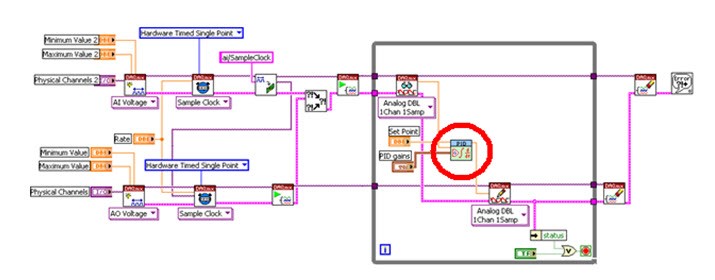
PID control resources for NI system

 LABVIEW Vi for implementing a single channel PID controller: 

https://knowledge.ni.com/KnowledgeArticleDetails?id=kA00Z0000019QlFSAU&l=en-IN


Use queue and channel wires

Use QUEUE to communicate between analog read and analog write task
 
One portion of code is creating (or producing) data to be processed (or consumed) by another portion. The advantage of using a queue is that the producer and consumer will run as parallel processes and their rates do not have to be identical. 
 
https://knowledge.ni.com/KnowledgeArticleDetails?id=kA00Z000000P7OfSAK&l=en-IN 

https://www.ni.com/en-in/support/documentation/supplemental/16/channel-wires.html

PID control labview example video:


https://www.youtube.com/watch?v=lyw_Ygeti3I&ab_channel=NIDevZone

https://www.youtube.com/watch?v=qMydcfZ_ZSs&ab_channel=FlexRIO

Thesis on PID control with labview

 
http://www.diva-portal.org/smash/get/diva2:757138/FULLTEXT02
https://www.ni.com/en-in/innovations/white-papers/06/pid-theory-explained.html
 

Simple on off control LABVIEW

Basic on off control using labview

 
Hardware timed PID control using shared sample clock and trigger

PID control with python and NIDAQMX


Edit on 15 Oct 2022

From https://forums.ni.com/t5/Multifunction-DAQ/Continuous-write-analog-voltage-NI-cDAQ-9178-with-callbacks/td-p/4036271?profile.language=en
 
1) Your code comments refer to wanting to be able to update output signals at 100 Hz, presumably under software control.  I assume this means you want <= 10 msec latency between your software deciding on an output value and having that output appear as a real world signal.     This is pretty tricky to accomplish with a buffered output task, and (I suspect) likely impossible when the device is connected by USB or Ethernet.  You may need to approach this with an unbuffered, software-timed, "on-demand" task and then live with the corresponding irregularities and uncertainties of software timing
2) The rule of thumb wouldn't apply to situations where low latency is the priority.  A lot of typical data acq and signal generation apps don't need real-time low latency.  They generate pre-defined stimulus signals and collect data for post-processing later.  The rule of thumb works well in those cases, allowing live displays with only *moderate* latency, enough for an operator to see what's going on.
3) In the past when I experimented with trying to do low latency hw-clocked AO, it wasn't trivial to get < 10 msec even with a PCIe device.  I recall that in order to get there, I needed to set up a few different low-level and fairly advanced DAQmx properties to non-default values.  I wouldn't have expected the defaults for a cDAQ system over USB to support that kind of usage so easily.
4) 

Sample rate and samples per channel


Hardware timed single point


Time stamping of acquired data samples from NI DAQ devices.

  1. DAQ cards do not have a time stamp mechanism, so we use the t0 (Buffer read time, not task start time) and dt in LabVIEW to time stamp it. Link = https://forums.ni.com/t5/Multifunction-DAQ/Loop-timing-with-NIDAQmx-for-Python/td-p/3656140
  2. DAQmx does not timestamp samples when they are taken on the DAQ device, but it does when it reads the FIFO samples onto the computer if you are reading in a waveform data type.
  3. Read = Reading from the FIFO buffer  into the PC
  4. Acquire = Acquisition of data by the DAQ hardware
  5. SOlution =  Each time you acquire, note down the time when the specific loop interation starts and then append dt to it for every column.
  6. Every row is a channel
  7. Every column is a sample taken in that channel.